LiDAR SDK Windows Linux evaluation usually goes wrong when a team treats host support as a brochure bullet instead of a validation problem. A module may enumerate on a workstation, produce a few good-looking frames, and still fail the real program because replay is weak, timestamps are not trusted, or the handoff to an embedded or flight-controller workflow was never proven.
This guide is for integration engineers, UAV developers, and robotics teams who need a practical way to test a LiDAR host stack before full system integration. Reddit surfaced real questions about software fit, large-data handling, and whether LiDAR workflows are worth the effort, but the technical guidance here is grounded in the current product export and current primary documentation from Microsoft, the Linux kernel, PX4, and ArduPilot.
| Quick answer | Use a LiDAR SDK Windows Linux workflow only after you validate four gates: host enumeration, frame correctness, replay and logging, and the final handoff path to your embedded or autopilot stack. |
|---|---|
| Best fit | Teams benchmarking a compact dToF LiDAR module on a Windows workstation and Linux bench rig before they commit to UAV, robotics, or industrial integration. |
| Decision rule | If you cannot prove that the same sensor output is readable, replayable, and interpretable on the host path you plan to support, the SDK path is not ready for field integration. |
Where a LiDAR SDK Windows Linux workflow fits best
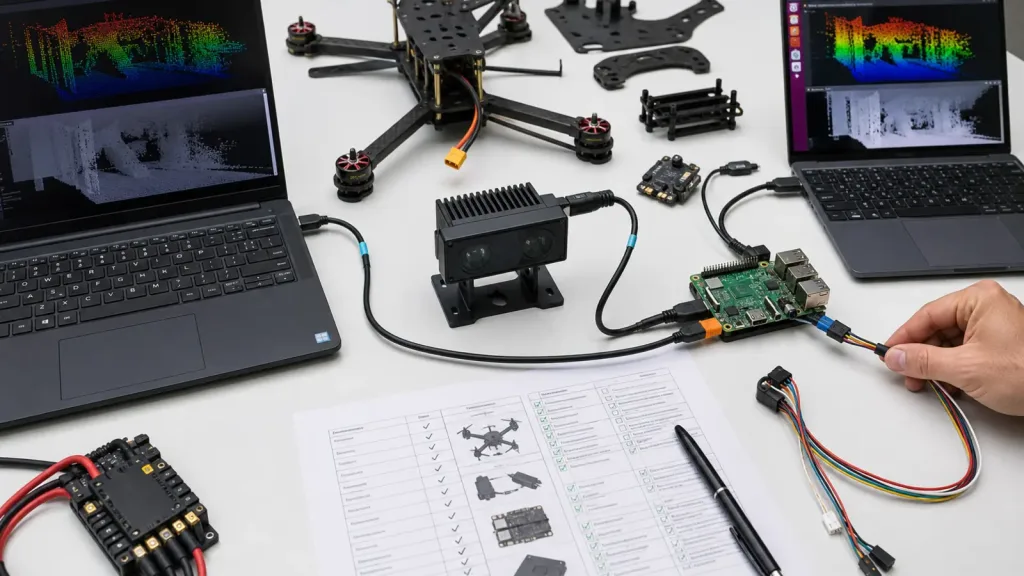
The strongest use case for a LiDAR SDK Windows Linux workflow is not abstract software comparison. It is integration risk reduction. Teams need one environment that gets them to fast bench visibility and another that helps them prove a deployment path. In many programs, Windows is the fastest way to confirm that a UVC or depth stream can be opened and inspected, while Linux is the better place to harden logging, metadata handling, automation, and handoff into an embedded stack.
That framing matters because current platform documentation draws a real boundary around what the host can promise. Microsoft documents that the Windows inbox UVC driver supports UVC-compliant devices and specific IR/depth stream formats, including 16-bit depth streams over USB. Linux kernel documentation shows that the UVC stack can expose both extension-unit controls and metadata nodes for more exact interpretation of timing and payload headers. Inference: Windows is often the faster operator-facing validation environment, while Linux gives teams more direct control over low-level capture and metadata-heavy debugging.
Use this article when the integration question is, “Which host path should we validate first, and what does success look like?” If you only need general interface orientation first, Purpleriver already has related guides on UART, UVC, or UDP choices, visualizing dToF depth data, and Raspberry Pi and Linux integration. This article focuses on the validation workflow that should happen before you lock the software path.
Decision table for choosing a host validation path
| Validation goal | Start on | Why it helps | Reject if |
|---|---|---|---|
| Confirm device enumeration and stream visibility fast | Windows workstation | Useful when the team needs quick proof that the camera-class path opens and the stream can be inspected. | The device only works in one demo app and the team cannot define the real output format or frame meaning. |
| Validate logging, metadata, and replay discipline | Linux bench rig | Linux UVC tooling and metadata access are better suited for low-level validation and automation. | Timestamps, payload interpretation, or replay scripts are too fragile to support repeated testing. |
| Prove a future embedded or flight-stack handoff | Linux or ARM follow-on path | The final system usually needs a deterministic path, not just a viewer. | The validation environment cannot reproduce the path the deployed system will actually use. |
| Support low-altitude UAV or robotics depth workflows | Both hosts in sequence | Windows can accelerate bring-up, while Linux is better for final bench-to-controller validation. | No shared acceptance test exists between workstation and embedded results. |
Exact featured-product parameters to validate first
Purpleriver’s current WooCommerce Featured product for this workflow is the LiDAR Drone Module – MRP-LD1 Solid-State dToF Sensor. These are the local facts available for host-stack evaluation planning.
| Parameter | Published value | Host-validation implication |
|---|---|---|
| Ranging principle | dTOF (Direct Time-of-Flight) | Use the SDK path to prove depth interpretation, not just basic device presence. |
| Scanning principle | SPAD (Single-Photon Avalanche Diode) | Expect a compact solid-state perception workflow rather than a single-beam distance-only path. |
| Emitter wavelength | 940nm VCSEL | Relevant to published product identity, but not a substitute for frame or host-stack validation. |
| Laser safety | Class 1 (FDA Recognized Eye-Safe) | Helpful for product screening, but the SDK path still needs its own logging and interpretation checks. |
| Range | Indoor 0.5-25m; outdoor 0.2-8m | Turn this into actual bench targets and replay cases instead of trusting the headline range on its own. |
| Ambient-light resistance | 80Klux | Still verify that your host capture path remains interpretable in the lighting conditions you care about. |
| Resolution / frame rate | 40 × 30 at 10fps | Check whether the host workflow can capture, replay, and act on this output without ambiguity. |
| Interfaces | UART / UVC / UDP | Pick the path that matches your validation goal: quick visualization, lower-level parsing, or network logging. |
| Software support | Windows / ARM / Linux / Android | This article treats Windows and Linux as separate validation environments with different strengths. |
| Power / weight | 5V, 1.2W, 8g | Useful when the same bench path must eventually move onto a compact UAV or robotics platform. |
A practical LiDAR SDK Windows Linux validation workflow
Use the workflow below before you tell the rest of the program that the SDK path is “done.” It keeps the validation grounded in observable host behavior and final-system handoff.
- Define the output you actually need. Decide whether the team needs a depth stream, a point-cloud view, a replayable frame log, or a controller-ready event or range output. If that answer is vague, the SDK evaluation will also be vague.
- Validate fast enumeration on Windows. Microsoft documents that Windows provides an inbox UVC driver for compliant USB Video Class devices and supports depth streams through the D16 format in the Media Foundation capture path. Use that to confirm fast bring-up, not to declare the entire integration solved.
- Validate repeatable logging on Linux. Linux kernel documentation shows that the UVC driver can expose extension-unit controls and UVC metadata blocks. That matters when you need precise timestamps, payload-header interpretation, or repeatable replay scripts instead of one-off visual confirmation.
- Compare the same scene on both hosts. Capture the same bench target sequence and check whether the stream interpretation, dropped-frame behavior, and replayability are consistent enough for a shared acceptance test.
- Prove the handoff path. If the final system is a UAV or robot, the host workflow must connect to the controller behavior you expect. PX4 documents how distance sensors are used for terrain following and holding, and ArduPilot documents low-altitude surface tracking with a downward-facing rangefinder. That means the host path should prove not only visualization, but also whether the output can be consumed reliably by the next control layer.
- Lock one validation environment and one deployment path. Many teams keep both hosts alive too long. Use Windows for rapid operator-facing checks when it helps, then lock Linux or ARM for the automated, replayable, deployment-adjacent path that the real program will ship.
If you need additional support material during this phase, use Purpleriver’s documentation resources and sample datasets to keep local validation evidence organized.
Interface, data, and controller handoff planning
The host choice only helps when it maps to the interface and controller path you will really use. Purpleriver’s featured product supports UART, UVC, and UDP, so the better question is not “which interface exists?” It is “which interface keeps the validation honest?”
| Path | Best early use | What to prove |
|---|---|---|
| UVC on Windows | Fast workstation stream visibility and operator review | That the stream opens consistently and the team understands exactly what the frames represent. |
| UVC on Linux | Replay, metadata, and low-level logging discipline | That timing, payload interpretation, and replay scripts are stable enough for regression testing. |
| UART | Embedded proof-of-concept or lean event paths | That the lower-bandwidth path still preserves the information the controller actually needs. |
| UDP | Networked logging or bench-distributed experiments | That network behavior and packet parsing do not introduce more integration risk than they remove. |
For UAV teams, controller behavior should be part of the same test discipline. PX4’s current rangefinder and terrain-following documentation describes the low-altitude behavior boundary and when the stack switches away from valid distance-sensor use. ArduPilot’s current Surface Tracking documentation likewise emphasizes a downward-facing rangefinder workflow and warns against using the wrong EKF height-source settings. The implication is simple: a host-side LiDAR validation is incomplete if it never proves the controller-side interpretation boundary.
If you need broader troubleshooting context, Purpleriver already has related articles on common LiDAR integration issues and on interface selection.
Realistic application case
A UAV engineering team wants to use one compact dToF module for low-altitude terrain-hold experiments and bench replay before it commits to a custom flight-stack interface. The fastest way to lose time is to jump straight into embedded code without proving what the host path can see and replay.
In this case, the team starts on a Windows laptop to confirm that the sensor enumerates and the depth stream can be inspected. It then moves the same bench target set to a Linux rig, where it verifies repeatable capture, metadata handling, and scripted replay. Only after those steps does the team attempt the controller handoff for a downward-facing rangefinder use case. That workflow is useful because it separates fast visibility from deployment-grade proof.
Common mistakes
- Declaring the SDK validated because the device opens in one viewer on one laptop.
- Skipping replay and metadata checks, which makes every later controller-side bug harder to diagnose.
- Mixing a Windows demo path and a Linux deployment path without a shared acceptance scene or test record.
- Choosing UVC, UART, or UDP based only on convenience instead of the evidence the final system needs.
- Assuming host capture success automatically proves terrain-follow or surface-tracking behavior in a UAV stack.
- Forgetting that software support on a product page is not the same thing as a validated workflow in your own program.
RFQ and evaluation checklist
| Checklist item | Approve only when |
|---|---|
| Shared bench scene exists | The same target setup can be captured and compared on both Windows and Linux. |
| Frame meaning is documented | The team can explain what the host is receiving and how it maps to the expected depth workflow. |
| Replay path exists | Captured data can be replayed after the fact for engineering review. |
| Interface path is chosen | The team knows whether UVC, UART, or UDP is the main validation and deployment path. |
| Controller boundary is defined | The handoff to an embedded, robotics, or flight-controller workflow is explicit rather than implied. |
| Recent evidence is saved | Logs, screenshots, or replay assets are organized well enough to compare regressions. |
Validate The Host Path Before You Lock The System
If your team is choosing between Windows and Linux for a LiDAR validation workflow, do not turn it into an operating-system preference debate. Turn it into a testable data-path decision. Use Windows when you need quick visibility, use Linux when you need deeper logging and repeatability, and only declare success when the handoff to the real system is proven.
The current Purpleriver featured module gives you a compact SPAD dToF reference point with documented UVC, UART, and UDP support plus software support for Windows, ARM, Linux, and Android. Use those facts to build a disciplined validation plan rather than a one-off demo.